Friendly Reminder
Recommended for use with X Browser v5.3.0 and above
Quick Start (TL;DR)
- Open any search engine’s search results page.
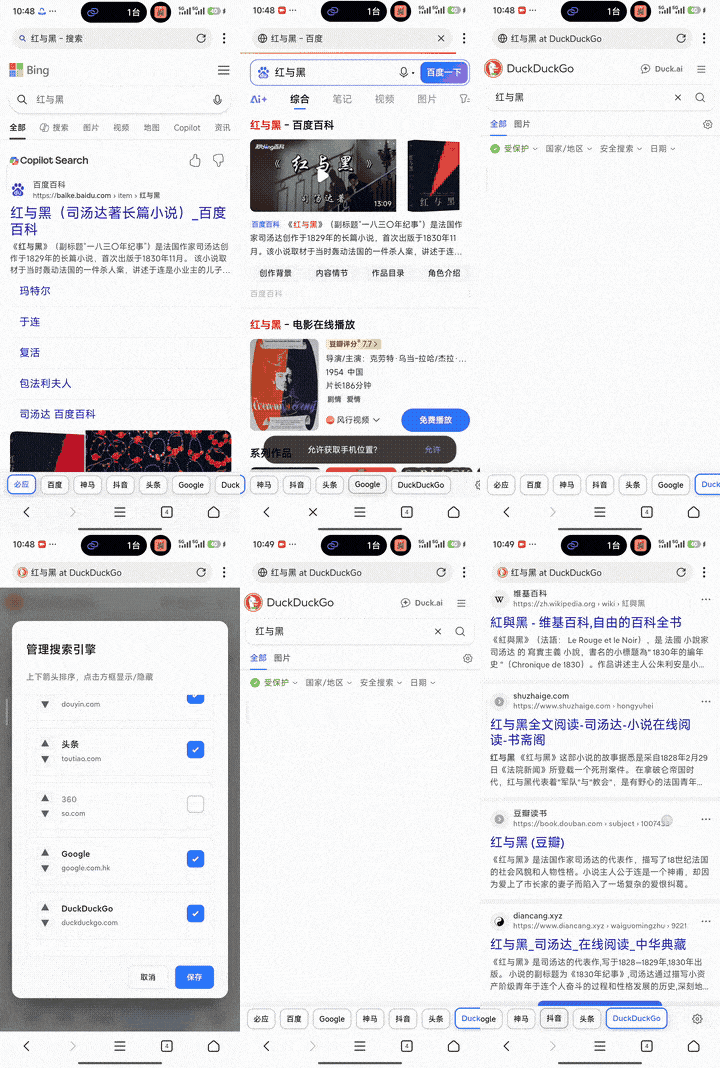
- A “Quick Search Bar” will appear at the bottom of the page for quick search engine switching.
- If you need to adjust the display order or hide certain engines, please follow the “Usage Instructions” below.
Script Introduction
This is an enhanced version of Quick Search Bar, provided by user DaMengZhu, with the following improvements:
- Search engine list is displayed at the bottom of the page for easier operation.
- Supports customizing the order of search engines in the list.
- Supports showing or hiding search engines in the list.
Usage Instructions
- The toolbar generally only appears on search results pages; if the page doesn’t display it, please confirm the script is enabled.
- The search engines in the toolbar come from your configured built-in/custom search engines.
- If the script provides a settings entry (such as button/menu/configuration interface), you can adjust the search engine order and choose to hide unwanted engines.
Script Information
- Author: DaMengZhu
- Script Source: https://github.com/examplecode/useful-user-scripts
- Script URL: https://www.xbext.com/useful-user-scripts/quick-search-bar-plus.user.js
FAQ (Troubleshooting)
- Toolbar doesn’t appear at the bottom of the page: Please confirm the current page is a search results page and check if the script is enabled.
- A search engine is missing from the list: Please first add a custom search engine in “Browser Settings -> Advanced Settings”, then refresh the page.
- Order/display settings not taking effect: Some pages cache script state, it’s recommended to refresh the page or reopen the tab before confirming.